Parent to Above.
Parent each selected layer to the layer above it.
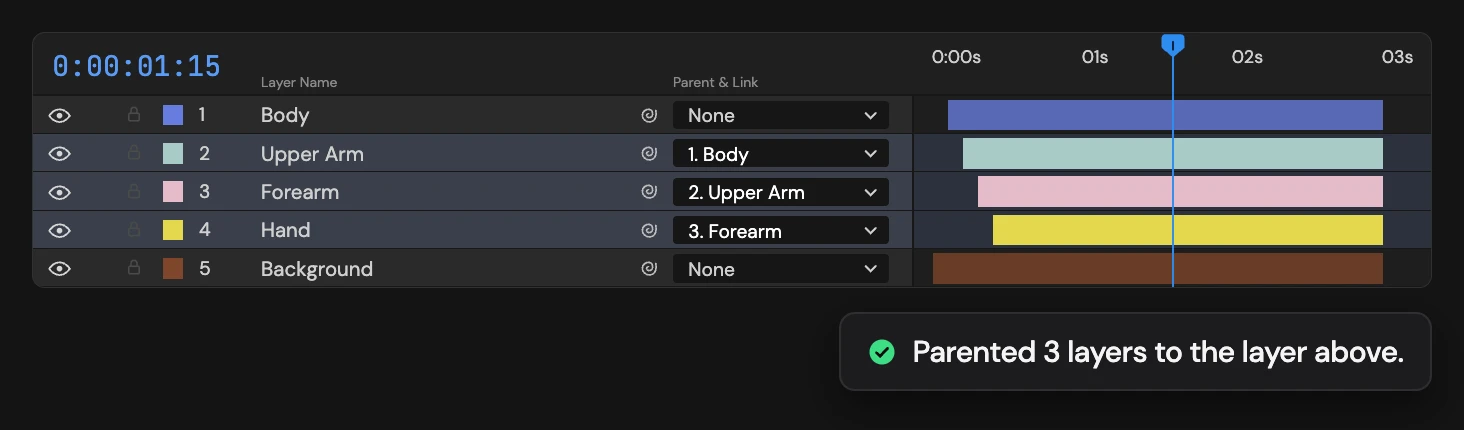
What it does
Parents each selected layer to the layer directly above it in the timeline, selected or not. Hold Ctrl/Cmd to parent to the layer directly below instead. The top layer (or the bottom one, with Ctrl/Cmd) is skipped.
Controls
- Click: Parent to layer above
- Ctrl/Cmd: Parent to layer below
Details
- Category: Layer Tools
- Kind: Script
- Also searched as: parent, above, below, hierarchy, layers
Guide
Use it
Select one or more layers and click Parent to Above. Each selected layer becomes a child of the layer directly above it in the Timeline, whether or not that layer is selected. Select a run of layers to link them into a chain that hangs from the layer above the run.
Hold Ctrl/Cmd as you click to parent each layer to the one directly below it instead.
- The top layer has nothing above it, so it is skipped (the bottom layer, with Ctrl/Cmd).
- Layers already parented the right way are left as they are.
- Children keep their place on screen, as with After Effects’ pick whip.
When nothing happens
If a selected layer is locked, or the new links would make a loop, Altar changes nothing and tells you. Unlock or unparent those layers first. One Undo restores every previous parent.